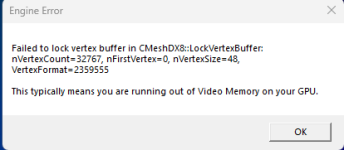
Addons causing hard crash.

Purple_s0ul

New member
May 8, 2026
3
0
1
Whenever I try to join the server without subscribing to all the addons beforehand, i can join fine, minus the standard long load time and heaps of missing assets. When I try to join the game AFTER subscribing to all of the needed addons, the loading screen gets stuck on "workshop complete" before crashing to desktop with the attached message. I've tried turning down all my settings to their lowest and that doesn't work, so I was hoping there was someone who could help me figure out if my PC just cant run it or if there's a different underlying issue.
 

Attachments

  • Screenshot 2026-05-07 223810.png
    Screenshot 2026-05-07 223810.png
    627.9 KB · Views: 9
  • Screenshot 2026-05-07 223549.png
    Screenshot 2026-05-07 223549.png
    7.5 KB · Views: 9
I had a issue like that, I wasn't able to join and I just uninstalled all my addons and only installed the zenith content pack
Or maybe its a ram problem as well
 
I had a issue like that, I wasn't able to join and I just uninstalled all my addons and only installed the zenith content pack
Or maybe its a ram problem as well
That's the thing, I ONLY have the Zenith content pack installed. If that worked for you, then it might just be a ram problem for me.
 
That's the thing, I ONLY have the Zenith content pack installed. If that worked for you, then it might just be a ram problem for me.
Based on the error message attached I would assume it's more of a GPU issue rather than a ram issue. May I ask, what GPU do you use? Also, have you tried possibly using an autoconfig file to reduce everything a bit? And lastly, have you tried clearing your gmod cache?
 
Based on the error message attached I would assume it's more of a GPU issue rather than a ram issue. May I ask, what GPU do you use? Also, have you tried possibly using an autoconfig file to reduce everything a bit? And lastly, have you tried clearing your gmod cache?
My PC has an NVIDIA GeForce RTX 3060. I wasn't aware that an autoconfig was a thing, what commands would you recommend using for the issue I'm having? Also, I have not cleared my Gmod cache, so I'll try that before doing anything else.
 
My PC has an NVIDIA GeForce RTX 3060. I wasn't aware that an autoconfig was a thing, what commands would you recommend using for the issue I'm having? Also, I have not cleared my Gmod cache, so I'll try that before doing anything else.
Yeah I would start with clearing your cache first and seeing if that helps. If not, in our main discord there is a channel called "scp-devlog". In the pins of that channel you can find a premade autoexec that reduces pretty much everything that could effect performance. I would copy that to the proper place and then try launching with it and see if it helps. The game will look buns, I'm sorry, but if it does work you can then start increasing certain things again until you reach of limit of how well the game can look before you are unable to join.
 
  • Like
Reactions: Purple_s0ul
Make sure you aren't running any GPU heavy programs, even watching videos on Chrome/Discord can take VRAM away.
Make sure you're running the x64 version of Garry's Mod.
Clear out your workshop files if you haven't, only install ZP addons to see if that fixes it.
Lower your Garry's Mod graphics settings, even with a 3060 it can be a load of VRAM that gets siphoned.

It's odd that you can join without subscribing, but it causes issues when you are. Are you able to join any other Garry's Mod servers without the similar issues?